
What is a Part?
A Part in Evergreen allows libraries to circulate components of sets and collections as separate items rather than as a single item if they wish.
Parts serve a circulation purpose: Without using parts, patrons are not able to request separate components or complete sets of titles. Parts must be used when splitting a set across multiple items on a single bibliographic record.
Parts are shared across NOBLE so they must follow the standard naming conventions below.
When assigning parts to items, you should use parts that already exist if they fit with how you subdivide your set. If the existing parts do not fit, you may create your own sequence following the rules below. If the existing parts fit the division of your set but use incorrect terminology, still use the existing parts and then report the record to NOBLE support for correction. Do not establish a parallel sequence of “correct” parts.
Do not put a part on an item that represents a complete set or use the part field for purely informational display or to augment information in the call number field. Instead, use your local prefixes, suffixes, or the call number.
If you can’t find a rule here that applies to your specific situation, email NOBLE support for clarification.
Adding Parts to Records
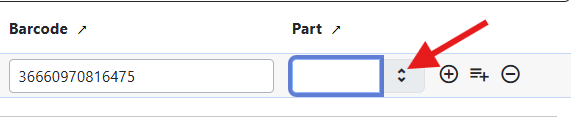
The Part field is located to the right of the barcode field in the Holdings Editor. Enter a part there, or use the drop down to choose an already established part that fits your item.
Part Naming Conventions
Terminology
If a set uses a specific term for each component, such as “Supplement 3” or “Volume 7”, enter that term. Otherwise, enter Part as a generic term*. Always capitalize the term. Do not enter plain numbers. Do not abbreviate the terms.
- Book 3
- Booklet 1
- Volume 4
- Disc 1
- Unit 5
- Case 9
- Part 2
*If the part is a year or range of years, use the year(s). Enter the full year, do not abbreviate.
- 1987, not Part 1987
- 2025-2026, not 2025/6
The unit should be followed by the part number as a single number or range of numbers separated by a hyphen. Do not use ampersands or other punctuation.
- Volume 1
- Volumes 2-3
- Discs 7-10
Numbering
Only use Arabic numerals. Convert Roman, cardinal, and ordinal numerals into Arabic.
- Supplement 3 not Supplement III
- Volume 7 not Volume Seven
- Book 1 not First Book
If your set has multiple numbering schemes you must include both sequences in the part. Only use a space to separate, no punctuation.
- Volume 2 Part 1
- Volume 2 Part 2
- Volume 2 Supplement
If your set uses volume numbers with subdivisions, you may enter the subdivisions as they appear on the item.
- Volume 1a
- Volume 1B Austria-B
- Volume 16 Q-Z
Do not invent a numbering scheme where none exists.
Use:
- Book
- Map
- CD
Not:
- Book 1
- Map 2
- CD 3
Audiovisual Conventions
Basics
Prefer the term Disc(s).
- Single disc: Disc 1
- Multiple discs: Discs 4-6
- For unnumbered supplementary discs, use your best judgement:
- Bonus Material
- Special Features
Seasons
- Do not enter “Season” in the part, only disc information. You may include season information in your call number if you wish.
- If your set is neatly divided into seasons, only use Season:
- Season 1
- Seasons 1-4
- If your set is divided into seasons, and the seasons are further divided into discs:
- Season 1 Discs 1-2
- Season 3 Disc 4
- If the last season of a show is called the “final” season or some other non-numeric term in a set, use a number for clarity:
- Seasons 1-4
- Seasons 5-7 not Season 5-Final
Multiple Formats
For combination packs containing multiple audio or video formats, use only these terms.
- CD
- DVD
- Blu-ray
- Blu-ray 3D
- 4K Blu-ray
- Vinyl
If your set includes disc media that is non-audio and non-video, be sure to designate them as ROM discs in the part:
- CD-ROM
- DVD-ROM
Local Records
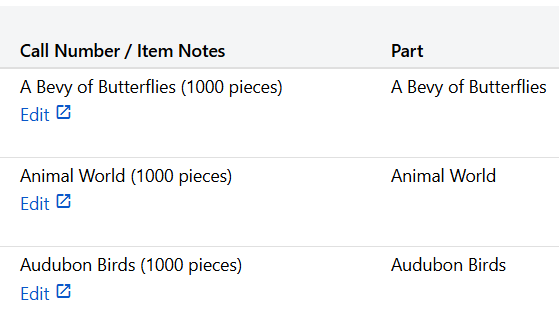
Libraries have much greater discretion when naming parts on local records. Typically, the part use case is when you use a single generic record to hold multiple distinct items. For example, if you circulate many different puzzles under a single puzzle record, you may assign parts with names that make sense for each puzzle so that patrons and staff understand how to place a hold on the specific puzzle they want.
If the distinction between items does not matter, do not use parts.